

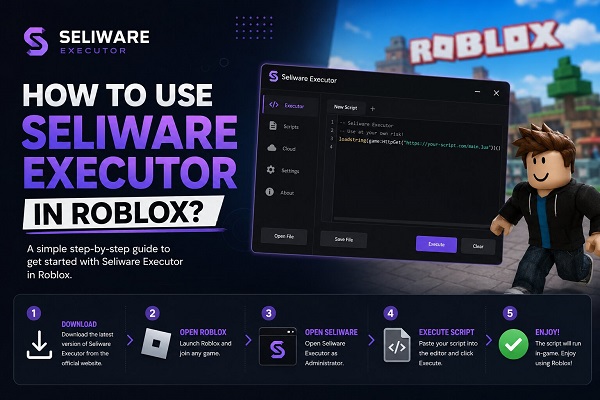
When talking about Roblox executors, you must have heard about Seliware Executor. It is because this particular product is getting extensive popularity around the globe. However, many players don’t even know how to use Seliware Executor properly.
Are you one of those and looking to learn deeply about this topic? You have come to the right page, as this guide will help you get proper knowledge about its usage. By reading this blog, you can learn how to use it with extensive safety.
Let’s get started and learn more about it.
How to Use Seliware Executor in Roblox?
Before you learn how to use Seliware Executor for Roblox gaming, you should make sure that your system is capable of managing this program. It is good to verify that your system and Roblox gaming fulfill the following requirements.
- Minimum Windows 10 or 11
- 64-bit operating system
- Stable and smooth internet connection
- Updated Roblox client
- System’s administration access
Once you have verified all these details, you need to launch Roblox first. After that, you can follow the upcoming steps to use Seliware Executor smoothly without any interruption. Make sure that you are following these steps as they are mentioned to avoid any problem.
Download & Install
First of all, you have to download Seliware Executor from a reliable source. Don’t fall for free resources, as they will waste your time. You should buy an executor from WYV as this is an official seller of these executors.
Once you have downloaded it, you need to connect to their Discord channel to get the license key and avoid any future issues. When you are done with this, it is time to install it on your system.
You have to extract the zip file to get all its documents and then click on the installer. For smooth installation, you have to choose “Run as Administrator” from the available options. Without doing this, you may be unable to install it or face incomplete installation or access.
Inject into Roblox
Once you are done with the installation of Seliware Executor, you should move to the execution of the script. For this purpose, you should open the executor where you will get an option labeled “Inject”.
You have to click on that option or button to connect your Roblox account.
Paste Your Script
After you have successfully connected the Seliware Executor with your Roblox account, you need to put the script in the editor window. Make sure that the executor supports the script format or changes its format before putting it there.
Start Execution
Once you have inserted the script, it is time to click on the Execute button. After a few seconds, you will see that changes have been achieved for which you have used that script. Keep in mind that these steps should be followed for safe Seliware execution in Roblox.
Common Issues You May Face While Using Seliware Executor
Some users have reported that they are facing particular issues while using this program to execute scripts for Roblox gaming. After comprehensive research, we have listed some of the common problems here with their suitable solutions.
Injection Failed
The most common error you can experience is an injection failure. It mostly happens because you are trying to inject the Seliware Executor before Roblox is fully loaded. Another common reason behind this is the outdated version usage of either the executor or Roblox.
Therefore, it is recommended to let Roblox load first and then try. If the issue persists, you may have to check for updates for the Seliware Executor or Roblox gaming app.
Restart Prompts Loop
Another problem that many users have reported is the appearance of multiple restart prompts on their screen. Many players have complained that they are getting such notifications on their screen’s multiple times.
It might be possible that your executor is crashing, which is showing this problem. It normally happens when you are using a free resource instead of an official Seliware Executor. To solve this issue, it is highly recommended to visit WYV and get an official product.
Final Verdict
In this blog, we have shared detailed steps to follow for learning how to use Seliware Executor for Roblox gaming. We hope you have learned the method properly after reading this guide. However, it is highly recommended to choose WYV for the Seliware Executor purchase to get instant support and an official product key to avoid any problems.